Fun with view transitions
I've been hearing about the View Transitions API a lot lately so I came up with an excuse to finally try it out. In the spirit of the Bad UX challenges popular on Reddit and social media, I wanted to create a ridiculous view transition.
I came up with a simple idea where the contents of the page "falls apart", and then the next page fades in. Here's what the falling apart animation looks like:
It's not too fancy, but it works. Now I need to convert that into a view transition.
Since my website is a static multi-page site, what I need is called a "cross-document" view transition.
CSS #
Personally, I'm always skipping to code blocks in a blog post so I'm going to show the full CSS first and go over each part of it below:
@view-transition {
  navigation: auto;
}

main > h1 {
  view-transition-name: heading
}

main {
  view-transition-name: nextContent
}

::view-transition-old(heading) {
  animation-name: signSwing;
  animation-timing-function: ease-in-out;
  animation-fill-mode: forwards;
  transform-origin: bottom left;
  animation-duration: 2s;
}

::view-transition-old(item-1),
::view-transition-old(item-2),
::view-transition-old(item-3),
::view-transition-old(item-4),
::view-transition-old(item-5),
::view-transition-old(item-6),
::view-transition-old(item-7),
::view-transition-old(item-8),
::view-transition-old(item-9),
::view-transition-old(item-10),
::view-transition-old(more-posts) {
  animation-name: fallOff;
  animation-duration: 1500ms;
  animation-timing-function: ease-in-out;
  animation-fill-mode: forwards;
}

::view-transition-old(item-1) { animation-delay: 0s; }
::view-transition-old(item-2) { animation-delay: 0.1s; }
::view-transition-old(item-3) { animation-delay: 0.3s; }
::view-transition-old(item-4) { animation-delay: 0.2s; }
::view-transition-old(item-5) { animation-delay: 0.1s; }
::view-transition-old(item-6) { animation-delay: 0.6s; }
::view-transition-old(item-7) { animation-delay: 0.4s; }
::view-transition-old(item-8) { animation-delay: 0.5s; }
::view-transition-old(item-9) { animation-delay: 0.8s; }
::view-transition-old(item-10) { animation-delay: 0.9s; }
::view-transition-old(more-posts) { animation-delay: 1s; }


::view-transition-new(nextContent) {
  animation-name: fade-in;
  animation-duration: 500ms;
  animation-delay: 2s;
  animation-fill-mode: backwards;
}

@keyframes fallOff {
  0% {
    transform: translateY(0) rotate(0deg);
    opacity: 1;
  }

  100% {
    transform: translateY(110vh) rotate(15deg);
    opacity: 0;
  }
}

@keyframes signSwing {
  0% {
    transform: rotateZ(0deg);
  }

  40% {
    transform: rotateZ(120deg);
  }

  60% {
    transform: rotateZ(65deg);
  }

  80% {
    transform: rotateZ(115deg);
  }

  90% {
    transform: rotateZ(90deg);
    opacity: 1;
  }

  100% {
    transform: translateY(110vh);
    opacity: 0;
  }
}

@keyframes fade-in {
  from {
    opacity: 0;
  }
}
@view-transition #
This at-rule only affects cross-document view transitions. You need to put this on every page, both the from and to, that you want to opt-in to transitions. If you just use this rule and nothing else, you'll get a default cross-fading animation. On my site I added this only to the home page and the layout for my blog posts because I only wanted transitions between those.
view-transition-name #
This is used to let the browser know which elements it needs to take a snapshot of for the transition. In a view transition you don't get access to the DOM, you get snapshots of it. Think of it a single element, that's an image, that you can apply CSS styles to. There's no DOM deeper inside you can access. Read more about this here.
::view-transition-old() #
This is how you target the content on the page you're coming from. You'll notice I created a few of these. This is because I wanted to stagger the animation of each element.
I can't just use one parent element as the view-transition-name and select DOM elements inside it (remember, they are snapshots), each element needs its own view-transition-name to be able to target it. I've added them using inline style attributes in my layout template.
::view-transition-new() #
This is how to target the destination content. I set it on the main element so it can fade in once the old transition has completed.
JavaScript #
Now, in order to limit which pages get transitions I need to listen for the pagereveal event and figure out where the user was transitioning from, and going to. What I'm doing here is looking to trigger the animation only when coming from the home page to a blog post, that's it.
window.addEventListener("pagereveal", (pageRevealEvent) => {
  const fromUrl = window.navigation?.activation?.from?.url;
  const toUrl = window.navigation?.currentEntry?.url;

  if (fromUrl && toUrl && toUrl.includes('blog')) {
    const fromUrlPath = new URL(fromUrl).pathname.replace("/index.html", "/");

    if (fromUrlPath === '/') {
      // allow transitions when coming from the home page to a blog post page
      return;
    }
  }

  // skip the transition for all other cases
  pageRevealEvent.viewTransition?.skipTransition();
});
PageRevealEvent #
The PageRevealEvent is triggered on the page being navigated to, but just before the transition starts. This lets you perform some custom logic on your page you might need for the transition, or allow you the ability to cancel the transition altogether.
One cool thing to note about the PageRevealEvent is that is has this sub-property pageRevealEvent.viewTransition.finished, which is a read-only Promise that you can await, so you can perform some logic after all of the transitions have completed.
PageSwapEvent #
I'm not using this event for this example but it's an import part of the View Transitions API so it's worth mentioning. If you need to perform some logic before the navigation away from the old page, you can use the PageSwapEvent.
window.navigation #
I'm also using the window.navigation property, part of the newer Navigation API (successor to the History API), to access the urls of the pages I'm coming from and to.
Final thoughts #
It's interesting to see how page transitions work, or at least how I think they work. Here's what I assume is happening:
- Starts by taking a snapshot of the old page.
- Navigates to the new page and and takes a snapshot of that.
- Then sets the new page's transition state to the beginning frame and holds it there.
- Starts animating the old page snapshot above the new page snapshot.
- Once the old page transition completes, it starts the transition of the new page's snapshot
- And finally leaves you on the new page, all snapshots removed.
Everything seems to be happening over the new page. Seeing that the URL immediately changes when you click on it, before all transitions happen, seems to confirms this. Plus the fact the DOM that's available in the PageRevealEvent, which is triggered at the beginning of all the transitions, is only the DOM of the new page.
Also further verified when I console.log(document.documentElement) right at the beginning of the PageRevealEvent handler, you see the view transition pseudo-element tree above all of the other elements. It disappears when all transitions are completed.
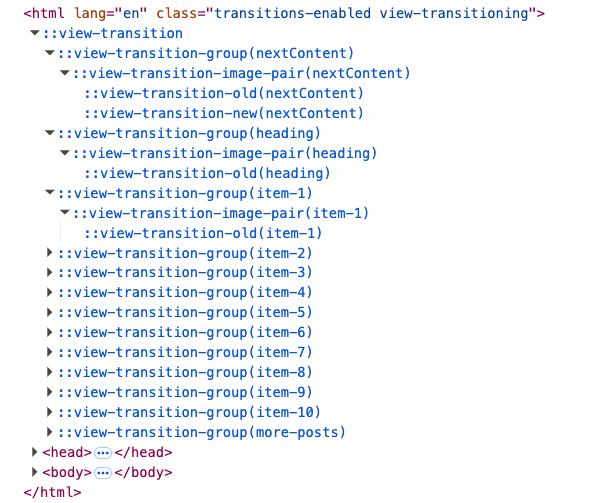
If you want to go see it in action:
- click on the "Enable View Transitions" checkbox in the footer (on Safari it's a switch)
- go to my home page
- then navigate to any blog post.
Enjoy!
Resources #
MDN links to all of the new properties and methods: