Delaying planned obsolescence
Kicking the tires on my old 2013 Macbook Air #
In Jan of 2021 I got a new-ish Macbook Pro. Before that, my main computer was an 11" MacBook Air (Mid 2013). Because I had a shiny new toy, I didn't need the Air anymore. So I tucked it away somewhere and forgot about it for a long long time.
Recently I decided I should finally deal with it and see if it worked, see if being discharged so long caused any major issues, etc. Surprisingly it worked just fine.
While I was there, I thought it would be a good idea to update the OS. It was on MacOS 10.15 Catalina, released Oct 2019. It said I had an update to Big Sur 11.7.10[1], released Sept 2023, that could be installed. The latest as of writing this is Tahoe 26.2, Sept 2025.
From Mid-2013 to Sept 2023 is almost 10 years of support, that's a pretty long time and beyond Apple's typical 5 to 7 year range.
Checking which apps still work #
After updating, I opened up a few of my most commonly used apps to see if they had any updates, and these were the results:
Chrome #
I was quite a few versions behind (can't remember exactly, but I think it was still in the double-digits). I let it update and after it finished I saw this:
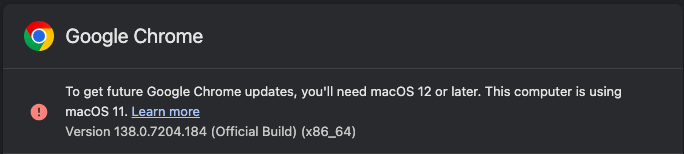
So Chrome is now stuck at version 138 because it requires a minimum of MacOS 12.
As of writing this, the current version of Chrome is 145. There have been a few major zero-day vulnerabilities since Chrome 138 so needless to say, I'm not going to be using Chrome on this version of MacOS.
Firefox #
Firefox, on the other hand, also updated to its latest version. But unlike Chrome, it did not have any warnings. In fact, I've gone back a few times since and it continues to update without any issues.
Thank you Firefox for continually supporting older devices.
VSCode #
I opened it, let it update to the latest version (Jan 2026 v1.109.3) and it closed immediately with a message saying that I needed MacOS 12+ to run it.
I wanted to see which was the last version of VSCode that still worked in MacOS 11, so I went backwards, downloading version by version, and thankfully I didn't have to go too far, the October 2025 v1.106.3 release was the last version that would still load.
That being said, I believe there have been some major security updates since then so I won't be using VSCode on this version of MacOS.
Sublime Text #
Not really an app I use anymore but because the latest VSCode didn't work and I didn't want to use an older version because it's more vulnerable, I wanted to see how the latest version of Sublime Text fared. I downloaded the latest (Build 4200, 21 May 2025) and it worked without a problem.
I'm seeing a pattern here of the underdogs apps being more thoughtful on backwards compatibility.
What's next? #
First, thanks to iFixit I was able to buy a new battery and easily replace it. Eventually, I'll work on replacing the SSD.
Next, I plan to use OpenCore Legacy Patcher (OCLP) to update to MacOS 13 Ventura, which according to reddit is probably the newest version my Air could run and still seem smooth. This should buy me a couple more years with this device.
Once I reach a point that not even OCLP can help me out anymore, I'll going to run Linux on it.
I found out after updating that Apple has actually released v11.7.11 on Feb 2, 2026 to update some certificates. https://support.apple.com/en-us/106338#macos11711 ↩︎